
What Can Advisors See in Our FamilyOS? And How Does Privacy Work?

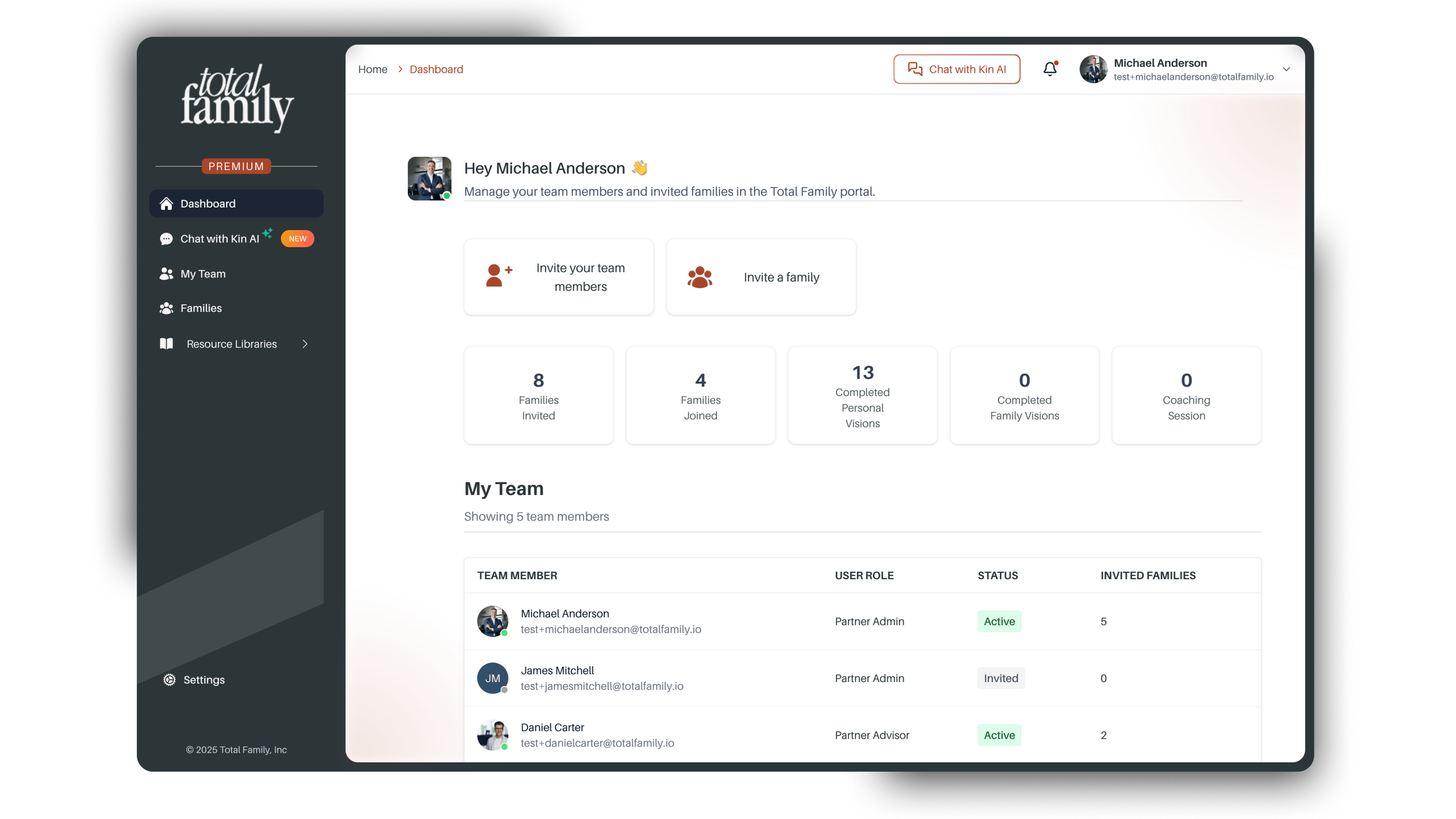
(Total Family Advisor Dashboard View)
One of the most common questions we hear from advisors is simple and smart:
“What exactly can I see about my client’s activity in FamilyOS?”
At Total Family, our FamilyOS platform is designed to support both clients and advisors. It empowers families to take ownership of their legacy, while giving advisors a clear view of their values, purpose, goals, and progress.
The key is balance. Clients own their data. Advisors support the process. And everything is structured to enhance your existing client relationships.
Here’s how that works.
Advisor Roles and Visibility
There are two types of advisor roles in our FamilyOS:
Partner Admin
This is the main account manager. Partner Admins can:
View all clients enrolled under the firm
Manage billing
Add or remove advisor users
Partner Advisor
This is the individual advisor view. Partner Advisors can:
Only see clients they personally enroll
Access data based on each client’s permissions
What Advisors Can See
Your advisor dashboard provides key insights at a glance:
Whether a client has accepted their invitation
Completion status of Personal Vision or Family Vision
Outputs from those exercises (values, purpose, roles, priorities)
Milestones — if the client has chosen to share them
The number of Legacy Letters written
What Advisors Cannot See:
To ensure client privacy, some elements are intentionally restricted:
The contents of your client’s Legacy Letters
Milestones— if the client has disabled advisor access in their settings
This was a deliberate design decision. Legacy Letters often contain deeply personal reflections, and FamilyOS ensures that these remain completely private. Similarly, Milestones can feel personal to some families. That’s why our platform gives clients the option to manage advisor visibility of their Milestones directly in their settings.
How Privacy Works with Family Members
If your client invites their spouse or children to join Total Family, each family member has their own login and profile. Privacy settings apply individually:
You can view a family member’s Vision and Milestones only if they choose to share them
Legacy Letters are always private unless a family member explicitly chooses to share their contents
Just like with the primary client, each family member controls their own privacy settings — including whether or not their Milestones are visible to their advisor.
What to Say to Clients About Visibility
We encourage advisors to include language like this in meetings:
“This is a shared space where we can work on legacy together. I can see your Vision once it’s completed, and I may be able to see your Milestones — only if you’ve chosen to share them. I can’t see the contents of your Legacy Letters, those are always private. If something is really important to you, don’t assume I’ve seen it. Call me. Email me. Bring it up in our next meeting. That’s how I’ll know what matters most to you.”
You can also send something simple like this:
“FamilyOS is a place where you can reflect and organize your thinking around legacy. If you add something you’d like me to see, you can give me permission in the FamilyOS system under Settings, or share with me by phone, email, or in a meeting.
Where This Fits in Your Workflow
Advisors often ask us how to integrate FamilyOS into their process.
The answer is: use it where you’re already doing great work.
Common use cases include:
Quarterly or annual review meetings
Family meetings or multi-generational planning sessions
Follow-ups on values-based planning conversations
You don’t need a new workflow. You just need a way to connect planning to purpose. Total Family gives you the structure to do it.
Three Common Questions We Hear From Advisors
1. Can I see everything my client writes in FamilyOS?
No. You can view their values, purpose, roles, and Milestones (if they choose to share them), but not the contents of their Legacy Letters. You will see how many letters and milestones have been written, offering helpful context.
2. If my client adds their family members, can I see what they’re doing too?
Yes and no. You can view each family member’s completed values, purpose, roles, priorities, and Milestones, if shared. But their Legacy Letters remain private by default unless they share them with you.
3. Am I responsible for reviewing everything my client adds?
Not at all. Your role is to support, not supervise. FamilyOS creates a space for meaningful client work. If a client chooses to share something personal with you, it’s because they trust you. That’s the relationship you’ve built.
We are continuing to expand client permission controls to give families more flexibility. But the foundation stays the same:
Our FamilyOS is designed to help families build meaningful legacies with the support of a trusted advisor.
If you ever have questions about access, roles, or client support, we are here to help. Contact us at hello@totafamily.io.
